Keep the upload roles distinct
Photo 1 should remain the seated pier performer and photo 2 the foreground singer. Check close shots and transitions for swapped faces, duplicated people or a third lead performer.
 ReelMorph
Two people by the water
Place two people in a warm seaside performance with a wooden pier, calm water and sunset light.
This example clip includes sound. Your generated video will be silent; download it and add the official original sound on TikTok.
Meet the trend
Raindance AI Trend recasts two people into a seaside performance inspired by the visual language around Dave and Tems' Raindance video: a wooden pier, open water, warm light and alternating roles. It is not a rainstorm dance effect.
Two separate photos supply the identities. A prepared reference guides the roles and camera movement in a seaside scene. The output stays at 15 seconds; choose the resolution and aspect ratio. The generated video is silent, with no music, voices or sound effects.
The setting feels cinematic while the two-role structure makes it personal for couples and friends. Recasting familiar composition with unexpected pairs creates an easy visual remix.
Prepare two distinct roles
Prepare one photo per person. Photo 1 maps to the seated pier role and photo 2 to the foreground singer.
Keep each face and upper body visible with similar lighting. Avoid distant full-body figures, back-facing subjects, crowds and objects covering faces.
Upload two JPG, PNG or WebP images, up to 10 MB each. Check each preview and confirm permission for both people.
Choose a Seedance model, resolution and aspect ratio. The duration stays fixed at 15 seconds to match the sample sequence. Review the live credit cost and your balance, then generate. The output is silent even if the example clip has sound.
Watch for swapped identities, changing clothes, unstable hands and pier details. Download the silent clip while the link remains available, then add only music or sound you are authorized to use.
The music and community remix
The visual reference comes from Raindance by Dave featuring Tems. Universal Music's release notes identify the artists and the Lagos-filmed official video. The later AI recasts are community-made works, not the official video.
Universal Music Canada · Dave shares the official Raindance video ↗Couples, friends and fictional pairs extend the format by changing who appears by the pier. Credit the musical and visual inspiration, and label your version as AI-generated.
Independent creation tool. Not affiliated with the original performers.
These frames come from the supplied example video. They show the two-role composition and warm coastal light; they are references, not guaranteed before-and-after results from uploaded photos.
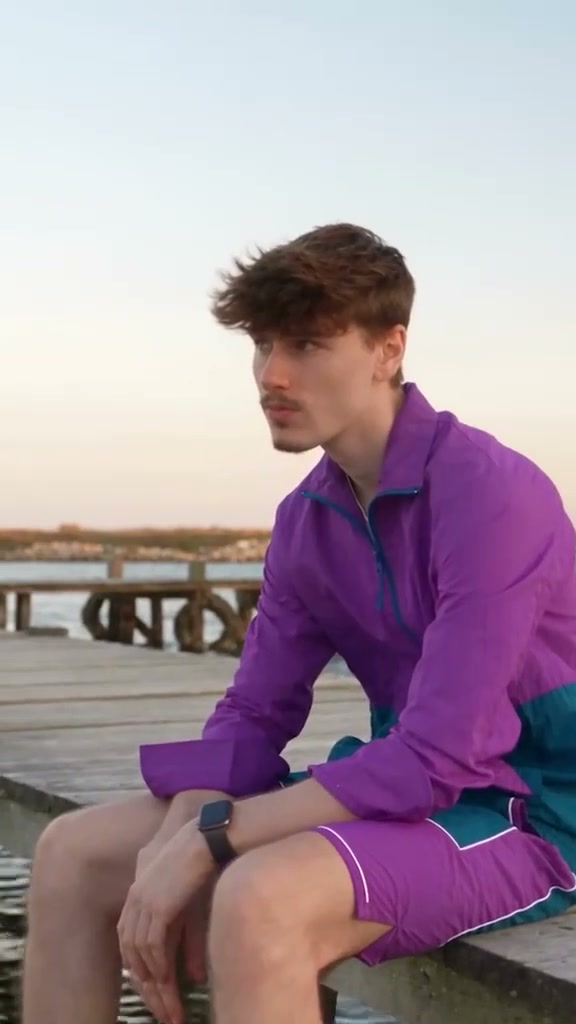
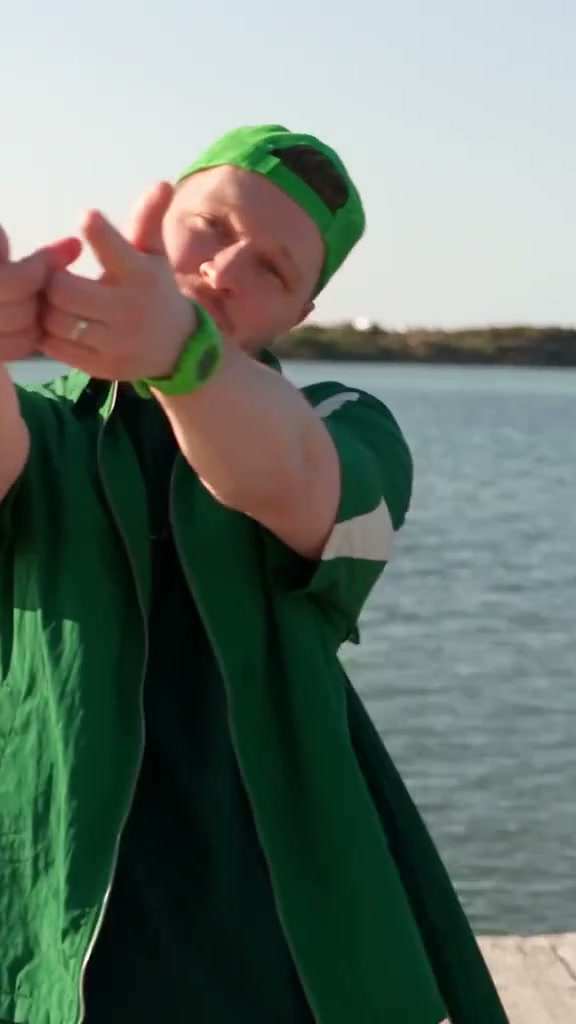
Balanced face sizes help both identities survive wide and close shots. Fine pier details, wardrobe and exact gestures can change during generation.
The effect alternates between two performers and several camera distances. Watch the entire clip twice: first for the performance, then for identity, hands, wardrobe and the pier background.
Photo 1 should remain the seated pier performer and photo 2 the foreground singer. Check close shots and transitions for swapped faces, duplicated people or a third lead performer.
Look for stable hands, natural balance and consistent clothing. Railings, boards, waterlines and horizons should not jump or merge when the camera changes distance.
Raindance AI Trend generates a silent 15-second video. Add only music or sound available to your account that you are authorized to use, then preview the entire edit. Adding a track later cannot repair visual lip movement or timing.
If this fixed two-role performance does not fit your photos, use the custom creator to describe a different seaside scene and motion.
Create AI VideoNo. This trend uses a sunny seaside and pier performance visual; the name refers to the song.
Yes. Upload one photo per person: photo 1 for the seated pier role and photo 2 for the foreground singer.
No. This effect generates a silent video with no music, voices or sound effects. The example may play its existing soundtrack, but your generated result has no audio. Add an authorized track separately after downloading.
Use two separate, permitted photos with one adult in each. Keep both faces and upper bodies visible, at similar scale, without sunglasses, crowds or strong occlusion.
Yes. Generated identities, clothing, hands and pier details can drift between shots. Review the whole result and do not publish a version that misrepresents either person.
The quote depends on the selected model and resolution for the fixed 15-second output, plus processing the reference clip. Check the live credit quote before generating; retries are separate generations.
Choose one clear photo for each role, review the live quote, and inspect the full result before you share it.
Create a Raindance AI video