One consistent lead
Compare the face, hair and clothing at the beginning and end. Reject a version that changes the lead or transfers their face to a supporting dancer.
 ReelMorph
Your photo. The lead role.
Step into the center of a street-dance crew with one photo. Create a silent 15-second performance with expressive gestures and coordinated moves, then add music you are permitted to use.
This example clip includes sound. Your generated video will be silent; download it and add the official original sound on TikTok.
A photo becomes a performance
Uptown Funk AI is a photo-to-video effect inspired by the street-performance look associated with Uptown Funk. It places your chosen person at the center of a crew, moving from face-level gestures and rhythmic steps to a wider group dance.
Your photo supplies the lead's appearance and clothing; the prepared 15-second video guides movement, framing and street atmosphere. The result is a newly generated silent video, not a frame-perfect face swap. Add permitted music after downloading.
The central performer gives the scene a clear focus, while coordinated dancers make the rhythm visible. A familiar face or distinctive outfit changes the character of the sequence without needing a long setup.
Prepare your street-dance clip
Use one clear photo of the person who will lead the crew. A full-body image helps describe clothing and proportions for the wide dance shots.
Pick one person in even light, facing forward or at a slight angle. Show the face and outfit; include the legs and shoes where possible. Avoid group shots, dark sunglasses, covered faces and motion blur.
Upload one JPG, PNG or WebP up to 10 MB. Check the preview and confirm permission to animate the person. Supporting dancers are generated automatically; you do not need to upload a crew or a reference video.
The duration is fixed at 15 seconds. Start with 16:9 to leave room for the crew, or choose another supported aspect ratio and resolution. Review the live quote and balance, then generate and follow the task status.
Check the lead's face across close and wide shots, the supporting dancers, feet and hand gestures. Download the silent video while the result link is available, then add music you are permitted to use. A new generation uses a new credit quote.
Music-video inspiration and AI remixes
The musical reference is Uptown Funk by Mark Ronson featuring Bruno Mars. Bruno Mars's official website links the official video. That establishes the music-video source, not the creator or first upload of every later AI remix.
Bruno Mars · Uptown Funk official video ↗AI remixes use photos to reinterpret the lead performance. The supplied example on this page is a reference clip, not evidence that an uploaded photo will produce the same result. We do not claim to have originated the trend or to be endorsed by its artists.
Independent creation tool. Not affiliated with the original performers.
These are frames from the supplied 15-second reference. Its existing captions and soundtrack belong to the example; the frames are not new results generated from your photo.
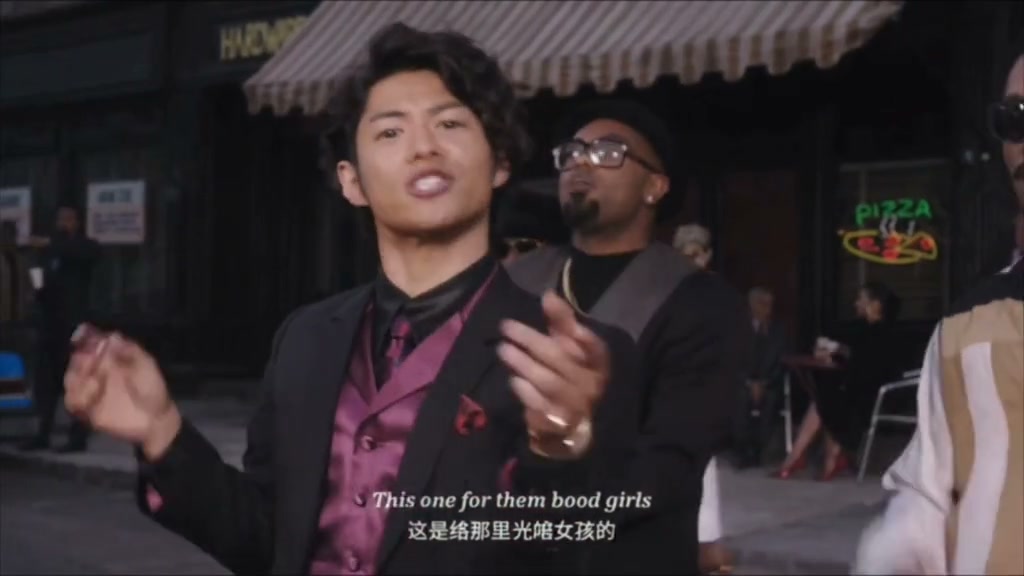
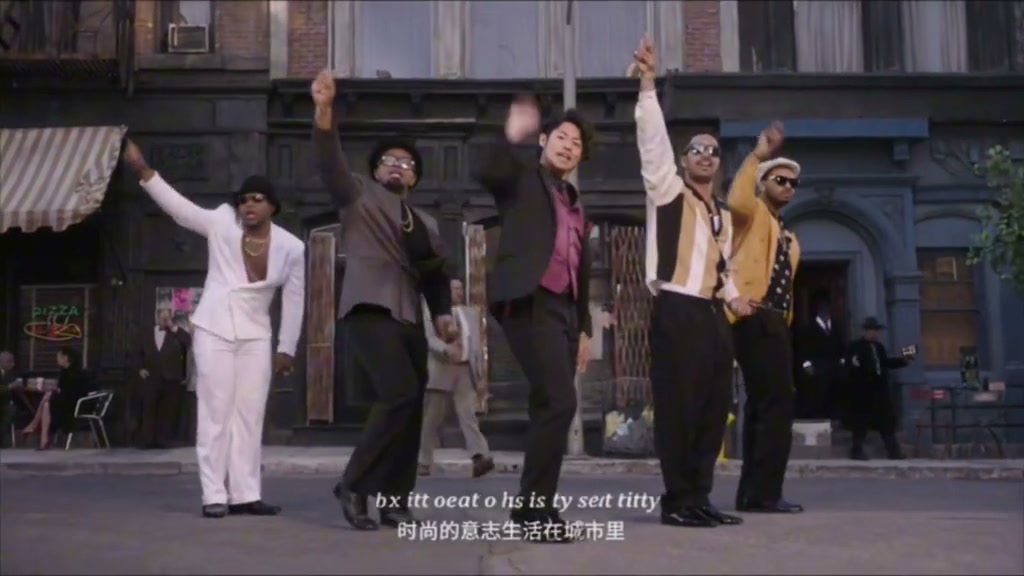
A clear face and visible outfit help define the lead. Wide framing gives the dancers space, but identity, hands, foot contact, clothing and background details can still drift. Exact choreography and lip sync are not guaranteed. The output is silent.
Watch the full 15 seconds, then pause during face-level gestures and the wide group shot. The reference shows the intended visual progression, not a guarantee of identity or movement accuracy.
Compare the face, hair and clothing at the beginning and end. Reject a version that changes the lead or transfers their face to a supporting dancer.
Look for sliding shoes, extra hands, overlapping limbs or duplicated dancers. A wider output can help show the group, but every result still needs inspection.
Keep a copy of the silent result. Add music you are permitted to use in an editor or publishing app, check its timing against the movement, and label the video as AI-generated. Adding music does not repair visual lip sync or motion errors.
Want a different street, smaller crew or another dance? Use the custom creator to describe your own scene.
Create AI VideoOne photo of one person. The model creates the supporting crew. A clear full-body image is useful for clothing and footwork, but a well-lit upper-body photo can also be used.
It generates a new video using the photo for identity and the prepared clip for motion and framing. It is not a pixel-for-pixel replacement, so appearance, gestures and backgrounds may vary.
No. This effect generates silent video because of music copyright restrictions. It does not include the reference soundtrack or generated audio. After downloading, add music you have permission to use in your editor or publishing app.
The duration stays at 15 seconds. The default is 16:9, with 9:16 and 1:1 also available. A narrower frame can change how much of the crew appears. Resolution follows the selected model.
The live credit quote depends on the selected model and resolution. Review it before generating. Confirmed failed tasks return credits; choosing to generate another version is a separate paid request.
The example is the supplied reference, including its existing captions and sound. Generated videos are silent, and the recipe asks for no captions or watermarks. Inspect the actual result before posting.
Choose one clear photo, review the 15-second quote and check the face and footwork. Download your silent video and add permitted music before sharing.
Create an Uptown Funk AI Trend video