ReelMorph

ONE PHOTO. THE LEAD ROLE.

Bulin 47 AI Trend Video Generator

Put yourself in the lead role with one photo. Generate a silent 15-second Bulin 47 AI Trend performance, then add the official original sound on TikTok.

This effect generates a silent 15-second video. Download it, then add the official original sound on TikTok. Exact beat and lip sync can vary.

Checking availability…

Generation cost: — creditsYour balance: —
Photo & credit policy

Photos are uploaded only when you generate. Provider storage is temporary.

Credits return automatically when a generation is confirmed failed.

9:16 · 15s · 720pMy videos

This example clip includes sound. Your generated video will be silent; download it and add the official original sound on TikTok.

Inside the effect

What is Bulin 47 AI Trend?

Bulin 47 AI Trend is a street freestyle photo-animation effect. Upload a portrait you have permission to use and generate an AI performance with expressive gestures, red lighting and a surrounding crowd using the preset scene description.

Your photo supplies appearance and clothing details. The preset scene description sets the gestures, framing and rhythm. The 15-second result is silent; download it and add the official original sound on TikTok. Character details and movement can vary.

Why does this format catch on?

The appeal comes from contrast: a familiar performance, an unexpected face and expressive movement in a short clip. That makes the idea easy to recognize, remix and share with friends. A personal version gives viewers something to react to, although no template can guarantee that a video will go viral.

Your photo, the lead role

How to do Bulin 47 AI Trend?

Prepare one clear photo and use the preset performance scene to generate a silent 15-second clip. Add the official original sound on TikTok afterward.

  1. Choose one clearly visible person

    Use a well-lit portrait or upper-body photo, facing forward or at a slight angle. Keep the face unobstructed and the head and shoulders inside the frame. Avoid group photos, collages, heavy beauty filters, motion blur and hands covering the face. Use a photo you have permission to animate; a full-body shot is not required for this effect.

  2. Sign in and upload your photo

    Upload one JPG, PNG or WebP up to 10 MB. Check that the person is clearly visible and confirm permission to use their likeness. The scene description is provided; review your settings and generate.

  3. Check the credit cost, then generate

    Choose a Seedance model, resolution and aspect ratio, then check the live credit cost. Duration is fixed at 15 seconds and audio generation is off. Follow the task status in the result area.

  4. Download, then add sound on TikTok

    Watch the whole performance and check the face, hands and framing. Download the silent video, upload it to TikTok and select the official original sound from the artist or original creator. Adjust the sound start and preview before posting; exact beat and lip sync are not guaranteed.

Add the TikTok sound to your Bulin 47 AI video

Your download has no music, voice or sound effects. Finish the soundtrack in TikTok after you have reviewed the video.

  1. Download the silent clip

    Review the 15-second result and save it to your phone while the download link is available.

  2. Find the official original sound

    On TikTok, find the original performance on Bulin 47’s or Kevin Wai’s official profile. Open its sound page and save the sound if available. Check the creator and recording, not just the sound title.

  3. Upload, add sound and preview

    Upload your clip in TikTok, open Add sound and select the saved official original sound. Adjust the start, listen through and check the action before posting. Availability and button labels can vary.

Adding sound changes the soundtrack, not the mouth movements. If the original is unavailable for your account, choose an available track you can use; do not expect an exact lip match.

The people behind the trend

Who makes the Bulin 47 AI Trend?

Bulin 47 and Kevin Wai

The original performance features Dominican artist Bulin 47 and creator Kevin Wai. In the encounter reported by MARCA, Kevin brings a speaker and a dembow beat; Bulin responds with a freestyle and dance outside a restaurant in Spain.

MARCA ↗

A new version from each creator

Creators use their photos to make AI performances and explore different characters and street scenes. Credit your inspiration when sharing and clearly label the video as AI-generated.

Independent creation tool. Not affiliated with the original performers.

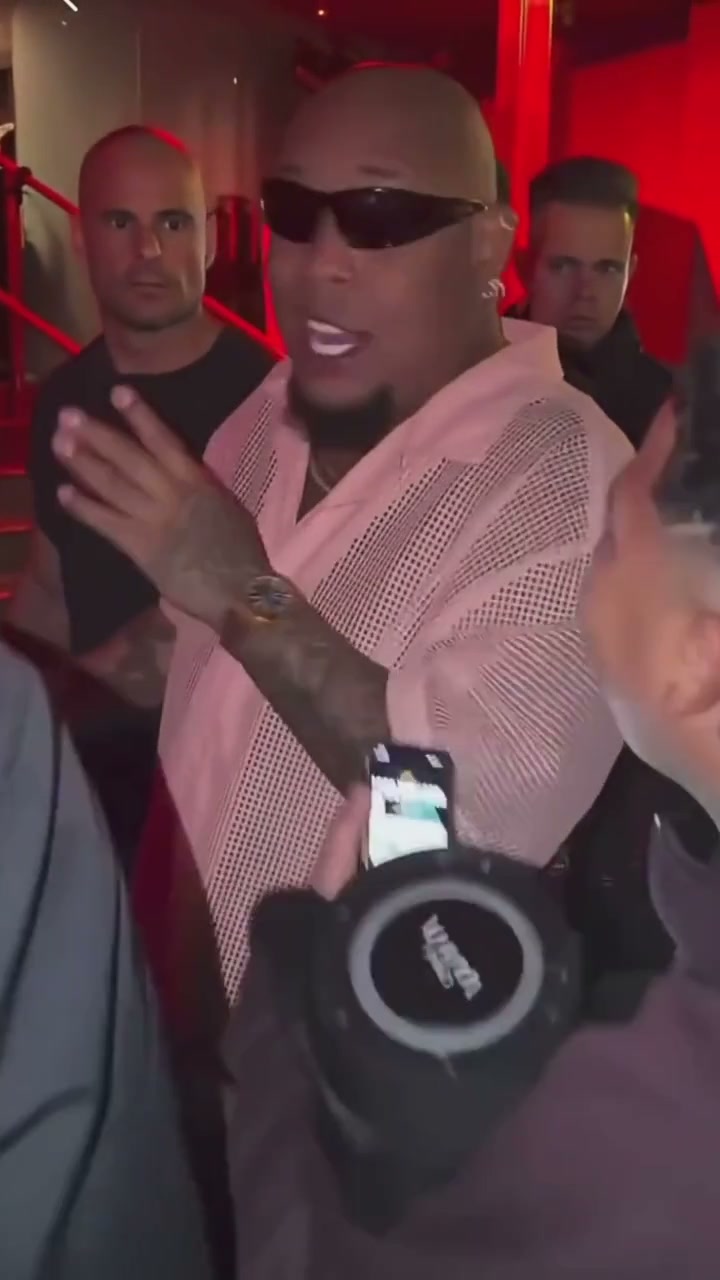
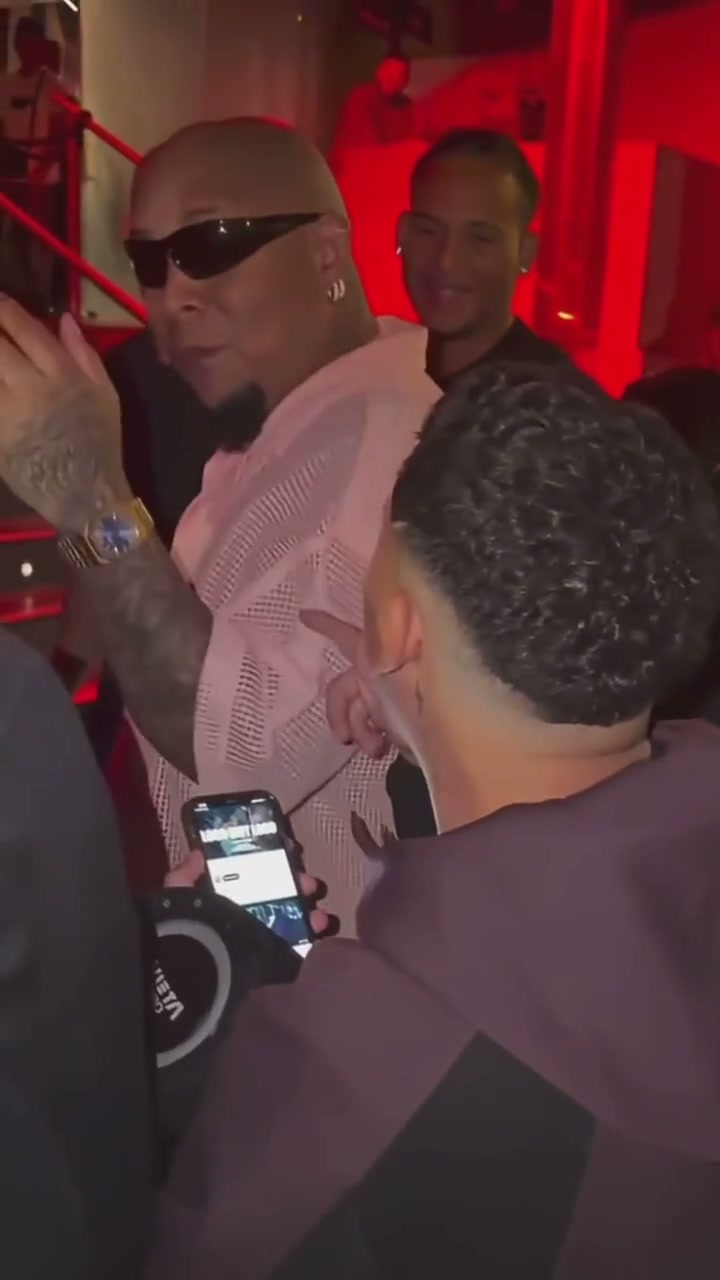
Bulin 47 AI Trend: performance and crowd preview

Frames from the supplied example clip show the lead performer, red lighting, crowd and foreground phones. These are example images, not generated results from an uploaded photo.

Bulin 47 example frame with the lead performer gesturing under red light
Lead performer · face, hands and upper-body movement
Bulin 47 example frame with the performer, surrounding people and foreground phone
Street scene · surrounding crowd, speaker and phones

Photo tips for the Bulin 47 AI Trend

Use one person, facing the camera in good light. Keep the face and upper body visible. AI can change background details or miss a likeness; review the result before sharing.

Review your Bulin 47 AI Trend video

The recognizable part of a Bulin 47 AI Trend video is the solo performance: expressive gestures, a close crowd and red street lighting. Use the sample to understand that composition, then judge whether your own result keeps the performer readable through movement. The sample is a reference, not a promise of identical faces or gestures.

Keep the lead easy to recognize

Watch the opening, a head turn and the final pose. Compare the eyes, jawline, hair and clothing with your photo. Strong colored light can obscure details even when the opening frame looks convincing. If identity drifts badly, try a clearer portrait with less face covering rather than assuming a higher resolution will fix it.

Inspect hands and the surrounding crowd

Pause during large gestures to check fingers, wrists and overlaps with nearby people. The surrounding crowd is part of the generated scene, not a set of extra portraits you control. For a personal reaction clip, a readable lead matters more than matching every background face to the example.

Finish the silent clip with sound separately

Bulin 47 AI Trend generates a silent 15-second video. After download, add a sound available to your account and check the rhythm from start to finish. Moving the audio start can change the timing, but it does not regenerate mouth movements or repair distorted frames. Keep a copy of the silent original for later edits.

Want a calm portrait animation or a different scene? Use the custom generator to describe your own movement instead of this fixed street-performance setup.

Create AI Video

Bulin 47 AI Trend FAQs

What does Bulin 47 AI Trend change?

Your portrait and the preset scene description guide an AI performance with expressive gestures, red lighting and a crowd. Review the character details and movement before sharing.

What do I need to get started?

One clear portrait you have permission to use. The scene description is provided. Choose your settings, check the credit quote and generate.

Is the original soundtrack included?

No. ReelMorph generates a silent video with no music, voice or sound effects. Download it, then add the official original sound on TikTok. An example clip with sound does not mean the generated result includes that soundtrack.

Will adding the original sound make the lips match?

Adding sound later does not change the existing mouth movements. Adjust the audio start to improve the overall rhythm, then preview the full clip before posting.

Which photos can I use?

Use one clear adult portrait that you have permission to animate, with the face and upper body visible. The model may still reject realistic faces under its own input rules. This preset has no pet or themed-crowd option.

How much does it cost, and how long does it take?

The cost depends on the selected model and resolution. Check the live quote before submitting. Fifteen seconds is the output length; processing time depends on the provider queue.

More AI video effects to try

Create your Bulin 47 AI Trend video

Create a silent 15-second performance, then finish it with the official original sound on TikTok.

Create my Bulin 47 AI Trend